How to build a data platform
Features
You can skip to the Summary.
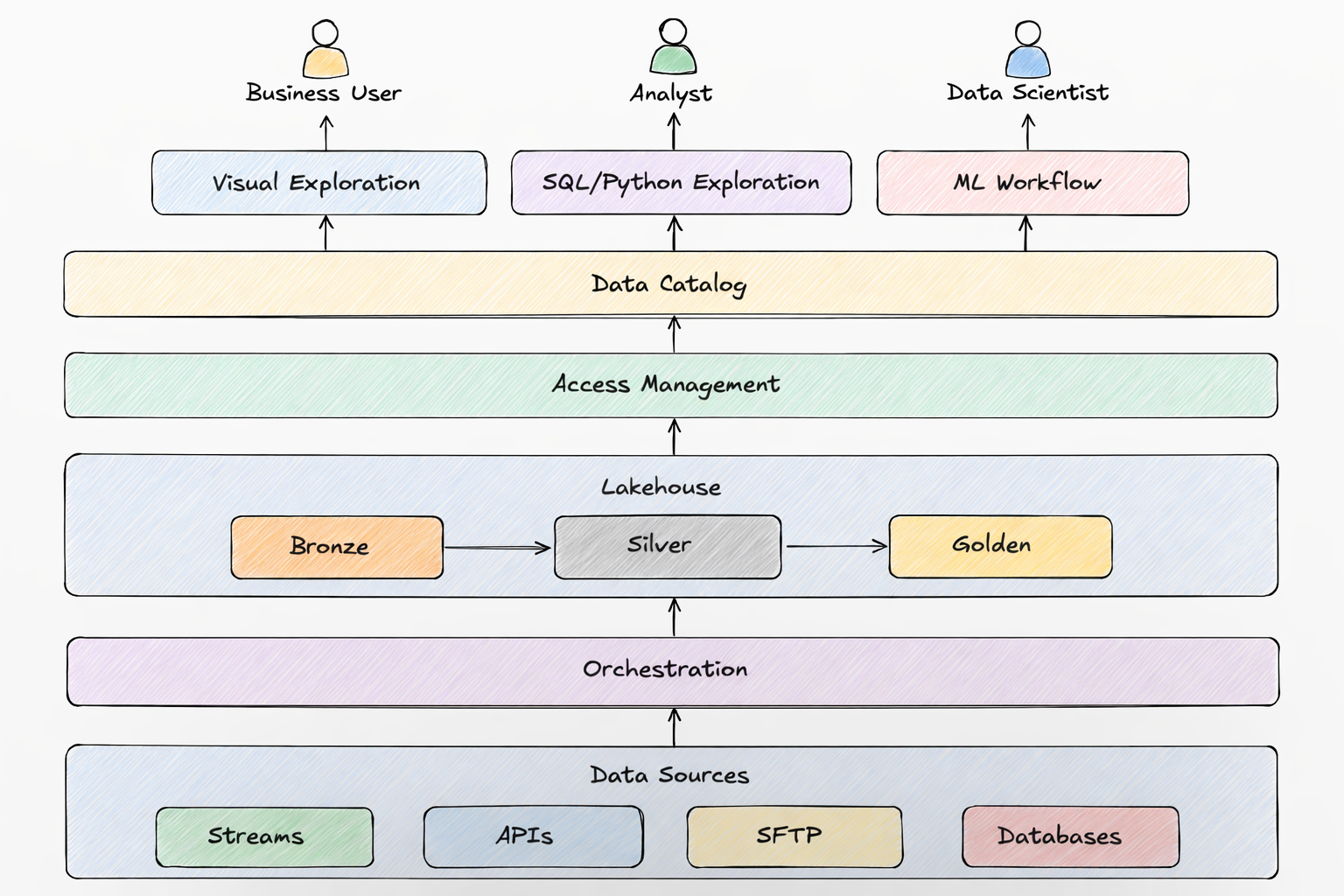
Pipelines
- It should be simple to add a custom data source, transformation and sink
- It should be possible control the throughput of a pipeline in order not to overload sources/destinations
- A data pipeline should allow conditions, branching, fanning out/in
- It should be possible to run data pipelines both on schedules and as dependencies on other pipelines
- It should be possible to provide custom logic for error handling
- It should be easy to deploy multiple copies of the platform for disaster recovery, testing and development
- Testing should be as close to production as possible in structure, resources and data
- The platform should be designed to scale X100 without a redesign
- Monitoring should be good enough to see the history, the current state, what runs next and should be helpful in debugging
Storage
It is convenient to store data so that it will be possible to query it using standard SQL from common data tools.
Tools
A platform should make it easy to:
- find data
- explore it
- visualize it
Participants
A platform should support multiple types of users. Every company names them differently. I will give an example naming in the brackets.
- Creators of the platform (data platform engineers)
- Users who will participate in the development of the platform (data engineers)
- Users who will build pipelines (analytics engineers)
- Users who will explore data using Python (analytics engineers, data scientists)
- Users who will explore data using SQL (analysts)
- Users who will explore data using visual tools (business users)
- Legal team to help classify the data and access
- Security team to help monitor data security and access
Monitoring
Pipelines should be monitored for:
- speed
- resources
- errors
- whether they start on time
- how the environment where they run scales up/down
- whether the amount of data statistically deviates from the usual
- whether the statistics of each data column/field deviates from the usual
- whether data is logically correct
- cost
- whether data contains PII
Storage should be monitored for:
- cost
Any element of the platform that can be hacked from outside, from within the code and by the users must be monitored.
Processes
The following processes should be established
- development of the platform from idea to deployment. In addition to the technical aspects such as code style and structure, documentation, testing, review, deployment, monitoring, performance, resilience, scale, disaster recovery but also cost and security.
- monitoring the platform and addressing production issues
- process for users who want to participate in the development of the platform and thus a process for each type of users
- processes to support each type of users
- data participants who are part of a single data organization there should be an established process for hiring and development for each type of data participant including not only purely professional aspects but also how people interact with each other to make the environment supportive and cooperative
Governance and Security
- process and tools for establishing and enforcing the data standards such as naming of databases, tables, columns
- process for classifying data, where each tier is stored and who can have, approve, provide and monitor access
Each process should have the corresponding tooling and documentation.
IMPORTANT: process is a means, not the goal. Processes should be reviewed and adjusted.
Disaster Recovery
- Backing up of data at all tiers should be a part of the platform. It should be a flag because in practice not everything needs to be backed up.
- Everything should be easy to deploy and roll back, ideally in at least 2 data centers (regions).
Technical requirements
To build the platform we need:
- version control: GitHub is the default unless you have reasons to prefer other git providers or alternatives.
- orchestration: Dagster. The alternative Argo, Airflow, Prefect are worse for data pipelines in my opinion but do your research.
- query engine: depends on the cloud. Snowflake, Spark/Databricks, Starburst are cross cloud. Spark and Trino are options for local development, can be deployed to any cloud but then you are responsible for it. Trino exists in AWS as Athena.
- IaC: I prefer Pulumi’s programmability over Terraform
- OS: your development, testing and production environments should be the same. Most likely you’ll use docker with some Linux flavor.
- shell languge: zsh has more programming and interactive features and is the standard on Mac.
- programming language: Python is tha language of data. Use type annotations with a linter. Since version 3.12 it can even run OS threads in parallel using
interpretersmodule. But it is relatively slow even when using modules implemented in C. Nevertheless usually multi-step pipeline that pipe large amounts of data lose performance in other places. If you do need speed consider Spark because it runs on JVM’s JIT. - ML: if you choose Spark, keep in mind that not every ML algorithm is parallelizeable. For serving models through APIs, you can save a model as ONNX, code the API in Go to handle spikes + use your cloud’s load balancer and registry.
- execution envoronment: k8s. Each cloud has its implementation. I’d use Docker Desktop or
kindfor local development. For monitoring you can instal Fluent Bit with Elastic Search and Kibana. - secrets: if you want to go cross cloud, use Infisical
- CICD: if you use GitHUb, use GitHub Action Runners.
- cloud: AWS is the oldest and mostly used. Google and Azure may be good due to the ecosystem of their tools with integrated ‘AI’.
- communication: Slack unless you have reasons to prefer something else.
- data exploration tools depend on your data scientists and the cloud. I have found cloud based notebooks useful due to the speed. Especially combined with Dask or Spark. The implementation of Spark also depends on the cloud or on the desire and budget to use DataBricks.
- data catalog + visualization depend on the cloud. For AWS it is better to use your own or paid DataHub + Metabase / Sigma Computing / ThoughtSpot / Tableau
- beware of keeping your business logic in one of these tools. It is better to keep your business logic in pipepines whose code is in a version control system like Git and use the tools for visualization only
- coding environment should give you the choice of all available AI models. Use the cheapest and quick for most tasks + the most expensive and slow for complex tasks. I personally use Cursor with Grok for most tasks + Gemini for more complex ones.